An artists journey

Category: Technology

Ideas about the mechanics, techniques, and technology behind image making.

  • The Histogram

    The Histogram

    Please permit me to rant briefly. I get incensed by the practice of most photo instructors to “dumb down” what we do. They assume people are incapable or afraid of anything technical. So they give a very short and often unintelligible description of something we, as photographers need to know, then go on. One example of this is the lowly histogram.

    I’m sorry to have to tell you, but all art has a technical component to it. Photography is one of the most technical.

    The histogram is like taking your temperature or looking at a graph of your portfolio performance. It is data that does not mean anything in itself but it is very useful to check. In this case, the histogram is just a measure of our image. It is valuable, but it is only one of many possible measures.

    What I hope to do here is do what your dad probably did (or should have done) in this situation – tell you to get over it. You need to know this, so get on with it. 🙂

    Not high tech

    The histogram is not a complex, fancy piece of technology. It is just counting and marking.

    Let’s say for simplicity that your image is black & white and is 8 bit depth. You know that this means the image is a grid of pixels, each having a value of 0-255. Now you decide to go through each pixel one at a time and keep track of a count of each pixel value you find. You come to a pixel that has the value 87. Go to your row of 87’s and increment it by one. You know, like
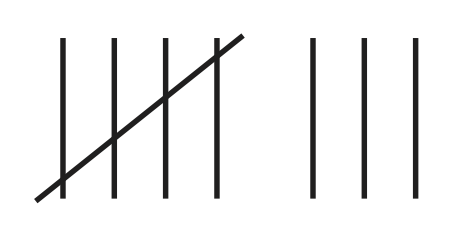
    Keep on going. If the next pixel is 127, go and increment the count for that bucket.

    After you count the values of all the pixels, you will have up to 256 groups of counts. Now, draw a graph (technically a column chart) or put the data in Excel and have it graph it. If you put the numbers 0-255 on the x axis (the horizontal line) and draw a point above each number corresponding to the count you made for that number, you will have a histogram.

    That’s all it is, just a count of the number of each pixel value. The actual number in each bin does not matter. What counts is the overall shape of the curve.

    An example

    Here is a fairly balanced black & white image and its histogram.

    People would call this a “good” histogram. It shows that the tones have counts from very close to 0 to almost 255, a full range from black to white The tones are spread fairly evenly. There is a bump in the distribution of the light tones – the right side- which is natural because there are big areas of snowfields and light gray clouds.

    There is no magic. You could manually follow the pattern I described and derive this yourself. It doesn’t “mean” anything of itself. It is just a way to get some information about your image.

    Descriptive, not prescriptive

    This is where people get confused, partly because they are misled by their instructors. The histogram does not tell you if you have a good or bad image. The histogram is descriptive, not prescriptive. That is, it is just information for you. It does not grade your image or tell you you exposed it wrong.

    IN GENERAL, if your histogram shows values bunched up far at the left or far at the right, that is a warning sign. It is telling you the image may be too underexposed or over exposed. Those values at the extremes show that you may be losing data that cannot be recovered.

    Whenever you see this situation it is a warning flag, not a stop sign. It may be necessary for the effect you want.

    Expose To The Right example

    You often hear the advice to “expose to the right“. This is good advice in general. It means bias your exposure higher – more histogram to the right – as long as there is no clipping of the highlights. This is because of some of that scary technical stuff you need to know. The dark areas of an image are more subject to noise. If you have to boost the dark areas that magnifies the noise. The best results are often obtained by overexposing a little and reducing the exposure of the whole image in post processing. Digital data retains more information when you are scaling it down than when you are scaling it up.

    Expose to the right is an example of a good way to use histograms. I always have the histogram view turned on in my viewfinder. As a matter of fact, possibly the single best reason to go to mirrorless cameras is to be able to get a real-time histogram. I always check it, before and after taking a frame.

    Let me emphasize again that this is information for you to use and make your own judgment. Do not let the histogram take your pictures. Keep artistic control.

    Yours can look anyway you want

    It is not unusual for me to shoot images that have a “bad” histogram. When I do this it is deliberate and I do not have to answer to the data police (yet).

    One class of very low key images is night photography. Often these are nearly all dark with only a few points of light. This is an example:

    It is hard to see at this size, but you can tell what is important from the histogram. Most data is clustered at the dark end. There is a spike at the brightest whites. These are the stars. Your instructor would tell you it is not a good histogram, but the image is exactly what I wanted. An image is properly exposed if it comes out the way you want.

    At the other extreme, a high key image is almost all white. This fence in a snowy field is almost all bright values:

    The distribution (the arrangement of the data values) is skewed way to the right, but not overexposed. But there is a spike at the left representing the black fence posts. Very high contrast. This is the result I wanted, so it is correct.

    These 2 examples of “wrong” exposures should broaden your understanding of what is allowed. Anything that matches your intent is a properly done image.

    A great tool, but just a tool.

    I hope I have given you a better feel of what a histogram represents. It is just an overall look at the data values in the image. It is there for information to help you make the images you want. A histogram is neither good or bad. It is just information. Other people have given their own interpretation of histograms and their importance. This is a good one.

    I am very thankful for the invention of histograms and their availability in modern cameras and post processing tools. It is an indispensable tool. I use them every day. But remember it is a tool. It is not there to tell you what you can do. You are the artist. Only you can decide the result you want.
  • Obsessive Clicking Disorder*

    Obsessive Clicking Disorder*

    How many images do you click off of a scene? Why? Our wonderfully fast cameras have enabled this thing I have heard called “Obsessive Clicking Disorder”. When we see a scene that looks promising we can blast away at 5 or 10 or maybe 20 frames a second to “make sure” we get the shot.

    I claim that that is often self-defeating, even lazy.

    Machine gunning

    So we point our camera at the scene and machine gun it for 30 frames. We are afraid we might miss “the moment”. Machine gunning is a brute force technique.

    Think about the shooting metaphor. A rifle allows a skilled shooter to place a single clean hole right where he wants it. A machine gun sprays bullets all over the place in an uncontrolled way. The single rifle shot is elegant and controlled and disciplined. To me it is craftsmanship.

    Those of us shooting fairly static and predictable subjects can usually take the time to wait for the right moment and fire off just one or two or a few frames. And, of course, if you are taking long exposures you’re not going to be firing away at high speed. Less can be more.

    Bracketing

    Another time where lots of images are captured is bracketing. In certain situations this is completely appropriate. Our marvelous sensors have a great dynamic range, but sometimes scenes require more. Exposure bracketing might come to the rescue by allowing an HDR compression of the range.

    Do very many of your situations actually require this? I couldn’t put a percentage to my work. But I know it is only the occasional high contrast situation that forces me to use it. The extra work and the varied results of HDR processing make me try to avoid it where possible. And scenes with movement are often not good candidates.

    Be aware

    But what is the alternative to obsessive clicking? How can you get the shot of the fleeting moment?

    To me the answer is being aware and attuned to the action going on. If we train ourselves to anticipate the “decisive moment” and be ready for it, we can capture it and know we have it. A good DSLR is fast (10-20 mSec to trigger an image capture, maybe even faster if using electronic shutter). Compare that to machine gunning at 10 frames a second. That is one image every 100 mSec. But within the regular, unvarying 100 mSec ticks a person can move a few inches or blink. You are just hoping that the odds will work in your favor. And often they do.

    An alternative, though, is to focus on the moment, the gesture. You might be amazed at the ability you can learn to recognize and capture that peak time when the gesture and the eyes and everything is right. Triggering the shot then will usually get the scene you hoped for.

    Gesture

    The incredible Jay Maisel describes this as waiting for the gesture. That is his version of the decisive moment. When we get in the flow and are completely attuned to the subject we can usually anticipate when these great gestures will happen. Wait for it. If you are concentrating, you will have time to press the shutter and get it.

    “Such moments are fleeting, requiring more than fast autofocus and reflexes. It demands that the photographer be able to read a scene as it’s playing out. He or she had to understand that all moments evolve, having a beginning, middle, and end. With that understanding, the photographer can anticipate that peak moment where all the visual elements or light and shadow, line and shape, color and gesture culminate in a moment that can only be captured in a fraction of a second.” Ibarionex Perello

    I find this is a wonderful and rewarding skill to learn. It is precise and immersive. You become highly engaged in the scene and the action. You learn to grasp the whole gestalt while still triggering on that perfect instant. It is a great feeling.

    Have you experienced it? You know it’s coming. You are in the right place to view it. Almost, Wait for it. NOW! When you hit the shutter you know you have the shot. It’s a great feeling of accomplishment to know you captured exactly the gesture you were anticipating.

    There is a time

    Do I ever blast away at high speed? Well, actually no. I stopped doing that when I didn’t have any more family doing sports that I was shooting. I do use exposure bracketing at times. On occasion I even take exposure bracketed panoramas.

    I recognize that there are times when any of us will take lots of frames. I’m just trying to convince you that machine gunning is a sort of backup plan, not a primary strategy.

    As an example of where I would do it, I love taking images of reflections in water. This is a dynamic scene that never repeats. I may take a several frame sequence to capture variations of reflections so I can choose the one that works best for me. But by the argument I used before, this is not an attempt to capture a peak moment by brute force. I expect each frame to be an excellent image but hopefully one will speak to me as the best.

    Be disciplined

    At the root it is about being disciplined. Closing down our options and forcing ourselves to take one frame of the decisive moment is kind of like the exercise I recommended of going out with 1 lens. It requires us to practice and develop our skill and use our mental quickness rather than brute force.

    I believe mental discipline and the ability to make fast decisions is required for photography. Learning this skill will, I believe, help us make a higher percentages of images we are proud of.

    This is just my own value, but I have discovered that if I can help it, I really don’t want to spend the time editing through 500 shots only to throw 400 of them away. At some level it seems to me that I am shooting randomly and grasping at straws rather than being deliberate and disciplined about my work. Photography is an art and a craft. Training and experience and discipline will improve our art.

    Try it. Let me know who it goes after you practice a while.

    space

    *Yes, it is a pun on Obsessive Compulsive Disorder. I know that is a potentially debilitating disease that 1-3% of the population has. It is not something to make fun of and I am not doing that or denigrating anyone suffering from it. I am just using this well known phenomenon to make a point.

  • Behind the Curtain

    Behind the Curtain

    “Pay no attention to the man behind the curtain” is one of the classic lines from movie history. It is brilliant and captures a universal truth.

    If you don’t remember, or if you’re young enough to never have seen The Wizard of Oz, Dorothy and her friends are terrified and fascinated by the projected image of an imposing wizard with his booming voice. But her dog Toto pulls a curtain aside and reveals an old man who is controlling things through levers and buttons. He tells them to pay no attention to the man behind the curtain to try to deflect attention from what is really happening.

    Once revealed, the magic is not intimidating anymore. This is very true in most things. Even the Wizard of Oz turns out to be a nice guy.

    Magic

    The famous science fiction writer Arthur C. Clarke said “Any sufficiently advanced technology is indistinguishable from magic.” This is also very true and we are effectively surrounded by magic all the time. For most of us, the internet is magic, making a phone call is magic, even getting in our car and driving it is magic. These and many others around us everyday are marvelously advanced technology products that few people really understand. We use them but don’t understand how they work.

    But everyone who uses a tool or product forms a mental model to help us understand how it works. Some of the models we make are wild hallucinations with no basis in fact. These incorrect models quickly break down when we venture into new or advanced territory. They no longer allow us to predict behavior, which is the purpose of the model.

    The way to counter this is to learn more accurate models of what is really happening. Learning the reality in effect lifts the curtain and lets us see how the thing really works.

    Maybe it is not as romantic and fanciful to learn the reality, but it lets us become more expert in the thing we are using. The magic becomes just technology that now serves us well.

    Photoshop

    I want to use Photoshop as today’s example of magic. I’m afraid that to many artists Photoshop appears to be magic. This is an invitation to get over that by starting to peak behind some of the curtains.

    I will not downplay it or dumb it down. That would not be treating you like an adult. Photoshop is very complicated. At first it seems like looking in the cockpit of a jet aircraft. I have been at it since about Photoshop 4 (it’s on version 21 now) and I have been fortunate to have the benefit of live and video instruction from some master teachers such as Ben Willmore, Dave Cross, and John Paul Caponigro. But every week I study it more and learn new abilities and ways of combining things.

    But there is a good side to all this complexity, too. All that capability to learn means all that capability that can be used creatively for your art. I rate Photoshop as one of the finest software products ever created, and I have used a lot and I developed software for many years.

    It is almost true that Photoshop is not magic. Content Aware Fill and Content Aware Move and a few other features may actually be magic. But for the most part it is just a collection of relatively simple tools that can be combined together to create artistic results.

    Demystify

    Demystifying is what happened with the curtain. It will happen for you with Photoshop if you burrow into it and get past the fear factor. You will eventually have a moment when the mists lift and you understand how people create with tools like this and how you can use the tools to realize your own vision. This is a moment of enlightenment. There is no right or wrong way.

    If you just try to memorize all the tools and settings and features you will go crazy. There are an unimaginable number of combinations. It is important to first learn the principles of how to work in it. I’m just going to discuss the Photoshop features that are most important to photographers.

    Basics

    I can’t teach you to be a Photoshop expert here, but maybe I can help point out some important concepts. There are basically 2 things you can do: transform pixels or blend and combine them.

    Layers

    One of the most important capabilities you will use is layers. Get very comfortable with them. A layer is just what it says. Think of it as a perfectly clear sheet of plastic. You create stacks of layers and each one can contain pixels or mathematical operations on pixels. A layer can be an image from your camera or things you have drawn or painted or many other things, including all or parts of other images. You can add or delete or rearrange layers at will. The image you see in the main window is the view looking down through all the layers. You can never see layers. You just see the pixels on the layers.

    Pixels on a layer can just hide ones below or they can be combined with pixels below using what are called blend modes. Blend modes can cause the pixels of a layer to lighten or darken or influence just the color or luminosity or contrast of pixels below.

    In addition, a layer can have a mask. The mask can block parts of the layer from view. A phrase you will hear often is “black conceals; white reveals”. The black areas of a mask prevent the pixels of this layer from being seen in the stack. This lets us be very precise in making changes to select parts.

    Tools

    Operating across all the layers and masks you have a large set of tools. These are like paint brushes or erasers or means to select certain areas to operate on. The tools let you manipulate the layers and masks to work some of the magic.

    While layers hold pixels, tools allow us to do things to the pixels. Pixels on any layer can be added or removed or colored or sharpened or blurred or moved around to almost any level. Same with masks, which are also just pixels but just function differently.

    Principles

    Focus on these concepts. They are some of the powerful principles that make Photoshop such a marvelous tool for manipulating pixels. When you get comfortable with these basic things you will be surprised how much you can do in Photoshop and how simple it starts to seem.

    So the reality is that Photoshop is “just” a large collection of fairly simple tools. The beauty of this is that these tools can be used and combined in near infinite ways to modify or create digital art. Each user has complete ability to express his vision without being constrained by the tools to look all the same.

    There is no lack of training available in books or on the internet. Look around and find some that work for you. I recommend Ben Willmore and Dave Cross as excellent instructors to start with. They can present powerful concepts simply and make all this wondrous capability accessible to you. Buying some courses on CreativeLive is one way to get their training.

    Living without magic

    The adult world has less magic than you had when you were a kid. A side effect of growing up is there is less magic in your world. In a sense this is good. The tools we use to create our art should be just tools. No matter how powerful they are, they are just things to be wielded in our creative process.

    Save the magic for your creative vision and spirit of adventure. Keep a sense of wonder as you go through the world. You are surrounded my magic. Don’t make it less important by viewing your tools as part of the magic.

    What you see and perceive and create is the magic.

  • Tools

    Tools

    Man is a tool maker. Tools are used in most activities in our life to extend our performance or help us get our tasks done faster, easier, and more accurately. The same is true in most of our art. Some people say that it is our tool making nature that allowed us to become the dominant species.

    A tool using artist

    I’m an artist. Specifically one who works with images originating as photographs. A camera is a tool I use. So is a computer. So is a printer. These tools do not create my art. I use them as part of my creative process.

    Yes, the tools allow me to create things I could not do otherwise. That just means they are good tools. My Jeep allows me to go places I would rather not have to walk, especially carrying my gear. That does not mean the Jeep creates my art. I know a sculptor who now prints a lot of pieces on a 3D printer. Does that make them no longer art?

    I believe in using tools to make my life better and to take my creativity further. Indeed some images don’t really start coming to life until I am manipulating them in Photoshop. As I try things and apply ideas and tools the essence of the image may start revealing itself to me. Note, though, that I – the artist- decide how the image should develop. I don’t sit back and watch Photoshop create it for me.

    Limits of tools

    There are probably some sharp Adobe computer scientists working on that right now., Maybe someday you will be able to point your phone at a scene and a “perfectly” composed and processed image will appear instantly in your social media feed. I hope for all of our sake that they decide that even though they could, they won’t. (Note: it came faster than I anticipated. Adobe announced many “AI”-based tools at Adobe MAX 2020. Now anyone can do almost anything to an image without know how they did it. Too bad.)

    Tools should be used as force multipliers. Not a crutch to let people with no skills seem to create something. That’s like going to DisneyWorld and believing you went on a pirate adventure. It is a manufactured experience that you did not contribute to. If you are over the age of 5 you know deep down inside it is fake.

    At the risk of being unpopular and sounding like a Luddite I will say I do not believe an image created entirely by a computer without an artist is art. It is just software combining patterns it has been trained with and throwing is a little random variability. Maybe this could be said of some artists, too. Let me just add that I spent an entire career working in advanced computer science, including artificial intelligence. So it’s not like I just hate technology.

    Digital fits my personality

    I am ADD enough that I don’t like there to be much lag between seeing something interesting and capturing it. It would be hard for me to work in a world of making multiple sketches of a scene to work out the best composition and staging, then spending weeks laying down the image slowly in layers with dry times between. All in order to create one work. I would abandon it after the first couple of sketches and be off to another idea.

    Photography is much more immediate and rewarding for me. See a scene. Click. Nice, but maybe move a little to the right. Click. Better. Maybe raise the camera a little higher. Click. Almost there, maybe reduce the depth of field. Wait for the right moment. Click. Good! Now I have a good starting point to work with on the computer to create a final image.

    In the computer I use a fairly disciplined non-destructive workflow. That just means never commit to something that can’t be undone. This does not slow things down and it actually makes it easier to get in a creative flow. That is because whenever I hit a dead end or even just decide I’m not liking the direction things are going, I can back up to any point I want and modify what I’ve done or even throw large “experiments” out and take a whole different path. The tools let my creativity flow naturally.

    This ability to freely experiment and take risks is wonderfully empowering. I even sometimes create several versions of an image. It is an embarrassment of riches to be faced with a hard choice of which one I think works best. The ability to be spontaneous and free is very important to my creativity.

    An artist

    I create art. My camera or my other tools do not create the art, I do. The fact that I start from a photograph should not matter at all. Some people think something is not art unless the artist had a long and difficult process from training through making an image. How myopic and judgmental.

    It had been said that an artist has to suffer. This is true, but you hear the statement from critics more than artists. Critics think they can analyze the process the artist went through to determine the worth of the art. Real artists know that art is suffering and what we learn and the feelings and vision we develop in the process guide our outcome. Art can be a cathartic expression of a deep experience, but that is not required.

    But this “suffering” is very personal and internal, at least for me. It may be the result of decades of failures to realize our vision. A suffering born of frustration that drives a continual renewal and a reach for what we feel but can’t quite express.

    It has almost nothing to do with a camera. That is just a tool, part of the technology used in creating art.

    Any tool

    When someone picks up a tool to create something as art, they become an artist. It doesn’t really matter if it is a brush, a pencil, a welder, … or a camera. What matters is what you do with it. Is something better and more worthwhile because it is carved from marble? Is it better if it is oil applied to canvas? Careful. These are dangerous judgments.

    The art I create is not because I’m a photographer. Photography is a medium that works very well for me. It fits my personality. I use it to create my art.

    I look at the creative process different from an oil painter or sculptor or author or graffiti painter. That is good. Artists are not supposed to be all alike. They should be as unique and individual as possible. That extends to the medium and process and tools, too.

    So, I’m an artist. I use a camera to capture pixels that become my art. I’m proud of it. I like what I create and it works for me. I’m very thankful for the tools I have. They help me create, they do not define me.

  • The Problem of Mega Pixels

    The Problem of Mega Pixels

    I love the capabilities of modern digital cameras, especially the wonderful sensors and great lenses available. But nothing is free, and I’m not just talking about the price of the gear. Having too many mega pixels can cause problems you may not anticipate.

    Resolution is wonderful

    I love extreme resolution. I’m not a fanatic about it, but I really appreciate it. I have not gone to 100+ MPixel sensors yet and I don’t normally do very large panoramas. Still, I get a thrill when I zoom in to 1-to-1 and see the great detail that is there. Then when I sharpen or contrast it more and the detail pops – wow!

    Having large resolution allows me to create large prints. It is a necessary thing since I do this for a living. It is also something I really like to do. I don’t think an image is complete until it is printed. For me, a print is the physical expression of the image.

    All things being equal, which they seldom are, higher resolution usually leads to sharper images. I love certain images to be “crunchy” sharp with great detail. It is part of my values that I can’t get away from.

    Also, larger files allow for more cropping freedom. I try not to rely on this. It is much better to compose the image the way I want it at capture time. But sometimes it cannot be avoided. Maybe the image works better in a square format, or maybe I’m only carrying a lens that goes to 70mm and I want to shoot something I can’t get close enough to. In that case I have to “zoom” in post processing by cropping the image.

    Or maybe I realize later that the real interest is in a smaller part of the frame. I have to crop the image heavily to salvage it. It’s not good practice, but I admit to doing it on occasion.

    For me, a great print from a well executed, high resolution file is a joy.

    Resolution is a pain

    On the other hand, high resolution can be a pain. It increases the cost and time of all the downstream stages.

    Every time I press the shutter it drops around 60 MBytes on my memory card. That is just the raw capture. It requires CFExpress or XQD cards to keep up. They are very expensive.

    As long as I can process the image in Lightroom the size stays around this, but when I step into Photoshop each image balloons to several hundred mega bytes. And that is even without adding a bunch of layers.

    Did you know that a Photoshop psd file (the native Photoshop format) cannot exceed 2 GBytes? Or that a tiff file cannot exceed 4 GBytes? I have found this out the hard way. Some of my images now have to be stored as psb files, the large file format version of Photoshop’s data.

    Processing and editing time goes up with pixels. I use a powerful computer with 64G RAM and very fast Thunderbolt3 disks, but it can take seconds to do a simple stroke when I am masking or burning or dodging. I have seen multi GByte files containing one or more embedded smart objects take 2 minutes just to save to disk.

    And you have to get to know disks in multiples of Terabytes. If you have a disciplined backup strategy, something I am fanatical about, then there are layers and layers of them.

    I have bought in to the need of powerful and expensive equipment for editing and storing my images. The biggest problem, though, is the slow editing speed. This interrupts the flow of my mental process. I don’t like waiting on the computer.

    Technique

    One of the unfortunate truths they seldom tell you when you are looking at a shiny new high resolution camera is that it is harder to take good pictures with it. This is partially because of the geometries you are dealing with.

    A full frame sensor, by convention, is 36 x 24 mm. My Nikon Z7 places 8256 x 5504 pixels in this space. That makes each pixel site 0.004 mm square. That is 4 microns from the center of one pixel to the center of the next. If you do not work in the world of integrated circuits or advanced physics you may have trouble conceiving these sizes. We do not directly encounter these dimensions in the real world.

    As an example, human hair ranges from 17 to 180 microns in diameter. Therefore the thinnest strand of hair you can possibly find would cover over 4 of these pixels. An average sized hair, around 50 microns in diameter, would cover a strip of at least 12 pixels wide across the sensor.

    A fun fact, but so what? The so what is that with each pixel being so small the problems of focusing and holding the camera steady are greatly compounded. Focus is critical and you almost have to rely on the very sophisticated focus system in your camera. Especially if it is contrast detection – meaning that it is searching for the best contrast, hence sharpest focus, measured directly on the sensor pixels.

    And for the sharpest results, don’t even think of taking a picture without using a good tripod. I don’t know how steady you think you can hold something, but consider that for optimum sharpness the camera cannot move or shake as much as 0.004 mm while the shutter is open. I can’t do that, especially after coffee.

    You need new lenses

    Another sad truth is that to realize the full benefit of your high resolution sensor you need lenses designed to match it. Current lenses achieve resolutions significantly better than was the norm a few years ago.

    The requirements for lenses for these new sensors greatly exceed the standard required for film or, say 6 – 10 MPixel cameras from just a few years ago. I have tried older lenses on my Z7. The results might be usable for some things, but nowhere up to the quality of something like a Z 24-70 f/2.8 designed specifically for the Z series.

    So another cost and problem of trying to achieve very high resolution is that you need to use lenses that will achieve the quality you are seeking.

    Why have lots of Mega Pixels?

    With all those problems, why should you want to shoot high pixel images? Maybe you don’t. That is what I am leading to here.

    Your gear should be chosen based on your intended use. These days many people will only post images on social media or put together a slide show of a trip or event. If they print at all it will probably be 8.5×11 inches (about A4 for you in the rest of the world). Quite honestly, a good 6 MPixel camera is all you would need for any of these things. Almost any mobile phone is great, except for the lack of lens choices.

    I have images from a 6 MPixel camera in my portfolio.They are good files and the quality of the pixels is good. I just would not try to print them very large.

    About the only thing that requires huge files is making large prints. This is a world I live in, but if you don’t then why bring these other problems on yourself? A good 12-16 MPixel camera is probably more than adequate for most people. They are smaller and lighter and cheaper. It is easier to take good pictures with them, it is easier to process them if you want to, and they require far less disk space. You can probably keep most of the images you want in online storage.

    But human nature being what it is, we can’t discount the lust factor. Pixel lust. Just like I know people who do some woodworking and have a workshop outfitted with an array of near commercial quality equipment. An expensive overkill, but if they have the space and money to burn, why not? You might need it someday.

    If you want to be logical and save some money and time, resist the lust for lots of mega pixels. You won’t need them.

    Its an OK problem to have

    Some of us are convinced we need them. Some of us just want the biggest and best. Many are just caught up in the hype of shiny new products.

    If you are going to have a high mega pixel camera, be aware going in of the costs and problems. But if you “need” it, go for it! The results are marvelous if you use the tools well.

    I love the results I get so much that I forget about the size and processing problems. I love the results so much that I gladly learn the required techniques to achieve them. They make all of my images better.

    Cameras and gear have advanced to the point where many of us cannot achieve the maximum they are capable of. But that is an astounding problem to have. What an embarrassment of riches! If we are the weak link in the process, we can learn and improve. We get better and our results get better.

    It’s a great time to be a photographer.

    What have your experiences been with high resolution photography? Let me know!