An artists journey

Tag: photographic technology

  • The Making of “Nothing Is Quite What It Seems”

    The Making of “Nothing Is Quite What It Seems”

    Today I’m going to discuss the making of this image. I created this abstract image titled “Nothing Is Quite What It Seems” from disparate elements put together to achieve the surreal landscape effect I wanted.

    But as the title suggests, nothing is what it seems to be.

    Base, Idea

    When i saw the thing creating the basic silhouette shapes I knew it needed to be a scene of dead trees in a barren landscape. In reality, though, these shapes are actually cracks in ice on a frozen lake in Colorado.

    I framed the scene up to isolate these 2 cracks that looked the most to me like dead trees. The “brush” in the foreground is the near edge of the ice, looking through to some rocks close under the surface.

    The processing required some touch-up editing and some dodge and burn and contrast enhancement. There was a little hue-saturation enhancement to bring out more of the yellow rocks.

    All of this was done as a smart object in Photoshop. Because I wanted to keep my options open I use smart objects a lot. They give me the freedom to come back and continue editing later. I don’t like to commit permanent changes.

    Texture

    With the basic form set, I started building texture. Tone adjustments in the smart object of the base layer helped. Bringing up the contrast brought forward more of the texture of the ice. This is the dimples and spots all over the image.

    To abstract it a little more I used the oil paint filter in Photoshop to soften the edges and give it a more painterly and abstract look.

    Color treatment

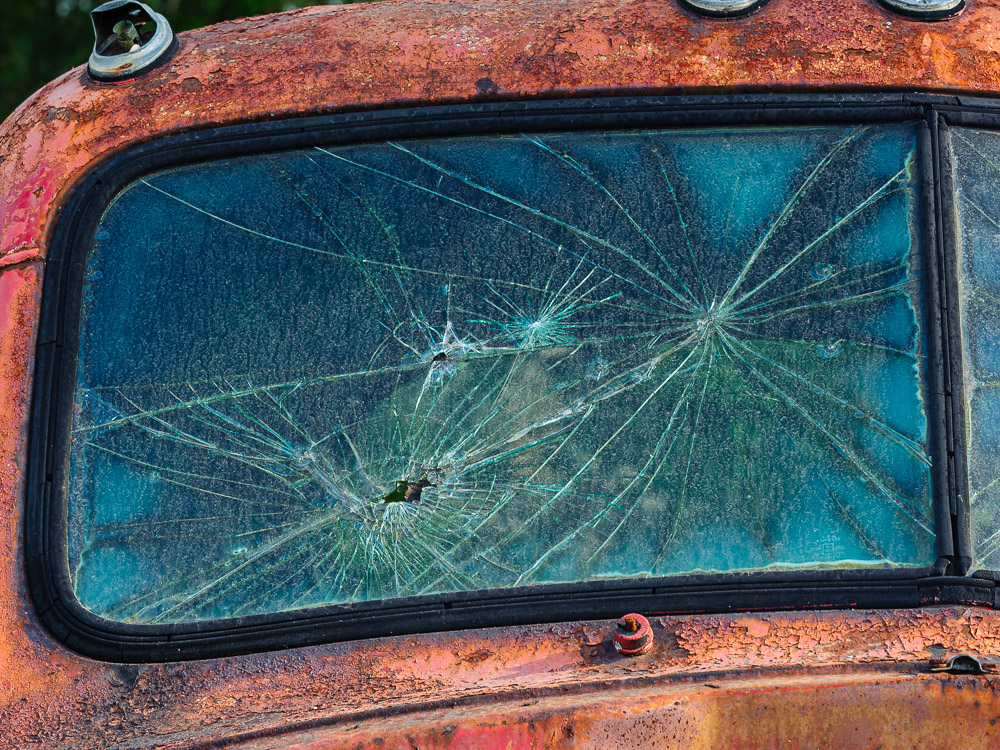
    I knew I wanted to change the color palette and make it look like it could be in an abandoned homestead on the Colorado plains. But I also wanted to layer on more interesting texture. After trying many overlays I settled on a beautiful rusty truck panel. The image I used is part of a 1948 Coleman Truck. Pretty rare, and it was aging beautifully.

    The truck had large rust patterns and also areas of old yellow and green paint. Using this to establish the colors across the image worked for me. This truck overlay is also handled as a smart object. Careful blending achieved the look I wanted without it looking like a rusty truck.

    Finishing

    The final polishing and tweaking takes a lot of time, even though it doesn’t make sweeping changes. As we used to say in software development, the first 90% of the project takes 100% of the schedule. The last 10% takes the other 100% of the schedule.

    There was final dodging and burning to do, bits of masking and retouching. Of course, there was a little bit of final color tweaking to my satisfaction. One of the reasons I use a flexible workflow is that I am prone to tweak things after I have looked at them a while.

    Process

    A comment on my workflow. Although this is a fairly complex image, nothing is permanently locked down or committed. While writing this I was able to open up all the layers and smart objects and see everything about how they were processed. I could still go in and change or modify anything in the image. And I did make some tweaks. I told you I can’t leave images alone.

    And as a very experienced Photoshop user I know new tools will be developed and I will learn new ways of doing things. These will lead to new ways to process images that I will want to take advantage of in the future.

    This is the way I choose to work this way on most of my images. It doesn’t take longer and it preserves total flexibility. I need that. I change my mind often!

    Summary

    I like the finished image. It seems to be a surreal Colorado landscape of dead trees, but it contains no trees or plains or anything else that it appears to be. It is truly not quite what it seems. Is this more interesting than a straight shot of the ice?

    Lightroom and Photoshop are powerful and addictive tools. Know when to use them and know when to stop. Otherwise you may never stop. It’s a great time to be doing imaging.

  • Is It Interesting?

    Is It Interesting?

    I find myself pondering this question a lot these days. More and more I believe the answer to “is it interesting?” overrides many considerations of composition and technique. This is a personal judgment, of course. as is the question of what is interesting.

    Learning

    Art is almost as much about our training as it is about our natural creativity. We all start somewhere, whether we have formal training or we are self taught. When we are learning a skill or an art we concentrate on the mechanics first.

    The tendency is to focus our attention on what we are trying to master. This is natural. What we should recognize, though, is that we may not really be making art in the process. Yes, it is art in the sense that we create it as art, but it is not a mature and well rounded style yet.

    Technique

    Photography is possibly the most technical of the normal arts. We have to master many layers of technology to get skilled at the craft. There is the camera with its hundreds of settings and controls, each of which may help us make a great image or a terrible one. Then there is the computer system required to store and process the image. And the software we choose to use for managing and editing the image. If you are taking it all the way to the end of the chain, there is the whole printing process to learn.

    Each of these areas is a huge field that could require years of study to master.

    If this is where you are, plow into it. Work through the learning process. Get to the point where the camera is a comfortable tool that you can use with little thought. Ideally you should be able to adjust all the major setting in the dark, just by feel.

    The image processing software is probably an even bigger challenge. Photoshop is one of the deepest tools I have ever used, and that is from the point of view of a long career in very complex software development. There are only a few people in the world I know of who totally “know” Photoshop. Julianne Kost comes to mind, but then she is the chief Photoshop evangelist for Adobe. It is her full time job to be able to train people on any aspect of it. Others at about that level are Ben Willmore and Dave Cross. I study and use Photoshop hours a week but I will never get to their level.

    But the good thing is, I don’t have to be a Ben Willmore. As long as I know enough to realize my artistic vision, I’m OK. I know of excellent and successful photographers who I consider to have only a rudimentary knowledge of the tools. They know enough to do what they want to do. I personally can’t be happy unless I feel I have mastered my tools enough to comfortably use them as an extension of my creativity. So I study a lot. But that is just my own burden.

    It should be about creating interesting art, not our ability to use the tools.

    Composition

    The next major pillar of image making is composition. It is another thing that can become a lifelong study in itself. We can burrow into art history, visual theory, Gestalt psychology, and all manner of ideas and opinions.

    We start with only an intuitive feel for good composition, based on art we have seen and our inherent notions of what we like. Probably we cannot express in words what good composition is. As we study and practice we get to where we have a more formal view of it. We can critique our own or other images in terms of their design. Eventually, we can compose our images intuitively, without much conscious thought. We can repeatedly produce compositions that please us.

    Keep in mind that most of this time, we are producing images that are now technically “correct” and have “good” composition. But maybe nobody wants to look at them yet.

    Is it interesting?

    This idea was clarified for me in a book about poetry. (Writing Poems, Robert Wallace. The link is for a later edition of the book) Weird, huh? It is a book about writing poetry rather than a regular book of poems. I find hints and ideas to improve and better understand my art from all sorts of diverse sources.

    The author made the statement that if the poem is not interesting, what good is it? It can have wonderful form, metaphor, irony, symbolism, etc., but if it is not interesting, no one will read it.

    I believe there is something here to apply to our art.

    I have seen, and made, too many technically perfect, classically composed images of … nothing memorable. While I value sharp, well executed images, and pleasing compositions with flow and leading lines and great light, I have come to realize that is not enough by itself to really be art. This is, of course, just my personal opinion. But then all art is a personal opinion. 🙂

    When you have mastered the basics I suggest you first visualize something that will make a memorable image. Then use your acquired skill to capture it perfectly. Don’t just work on technique. You’re better than that.

  • Do You Need A New Camera?

    Do You Need A New Camera?

    The reflexive answer is “Yes, of course”. Most of us lust for new equipment. But think about it a bit. What about your camera is holding you back? How will having a new camera make you a better and more creative photographer?

    Resolution

    Resolution is one of the technical parameters of cameras that increases over time. It is an easy thing to measure and use as a figure of merit for comparing cameras. Is it a good measure?

    Well, yes, more is better, some of the time. It depends on your needs. Will you be making and selling prints that are 48″ or larger? You probably need a lot of resolution. But even then, it depends on what you shoot. If your subjects are highly detailed and you want your viewers to be able to come up nose-length to the print and see every bit of the fine detail, well, it comes with a cost. You want all the resolution you can get. And more.

    Be aware there is a cost. Not just the price of the camera. File sizes get huge. After I’ve taken an image into Photoshop for editing I sometimes end up with files that are more than 4GBytes in size. Everything has to scale up with this: the computer memory, all my disk sizes, including backups, memory card size and cost, and my speed of working slows down.

    So far it is worth it to me, but there will be a limit.

    Speed

    One of the other metrics people use to justify a new camera is image capture speed. If your current camera can “only” take 5 frames a second wouldn’t it be a lot better to have one that takes 10 frames a second?

    Maybe. It depends on what you do. I no longer shoot sports so this has become insignificant to me. Occasionally I need to take a burst of a few frames to try to capture a certain moment. It is becoming more and more rare, though. I usually challenge myself to use my instincts developed over the years to know how to recognize and capture the “decisive moment” instead of blasting through a group of 20 frames hoping the one I want is in there somewhere. It usually works well for me and I feel like a better craftsman.

    Again, your mileage will vary. It depends on the real needs you have. Don’t just optimizing specs.

    Dynamic range

    Dynamic range is one that can draw me. This is the range of dark to light values the sensor can reliably record.

    I often have very wide exposure ranges in my images. It is much better for me to be able to capture the entire range in one frame instead of relying on putting together an HDR set. This is because many of my pictures are strongly oriented to motion. That makes each frame unique. It is almost impossible to stack them for HDR.

    But are you really at a disadvantage with what you have today? I shoot Nikon, so that is all I can talk about. Full frame Nikons since at least the D800 (about 2012?) have excellent dynamic range. So if you have a high end camera that is not more than about 10 years old it probably does a very good job. Note, the image with this blog is one of my earliest pictures shot on my D800. Great camera.

    Are you really being held back?

    I suggest you give it careful consideration before laying out a lot of money on a new camera. Unless you just have thousands sitting around that you want to get rid of. If so, congratulations. Check out my prints. 🙂

    Instead of “do I need a new camera” maybe a better question for yourself is “how do I make better images?” This is much more difficult and important. And it is something you can do without spending much money.

    Ansel Adams once said “The single most important component to a camera is the twelve inches behind it.” Meaning, of course, that the photographer, the artist,, determines the quality of the image. Do you have the skills to get the best from the equipment you have now? Do you really know all the ways you can edit and improve your “negatives”?

    Todd Vorenkamp, whose opinion I’ve come to respect, said:

    “Search yourself for improvement, not your gear. A great photographer can make a great photograph with any camera. A poor photographer can make a poor photograph with the world’s most expensive camera. Photography is a technologically based art form, but the technology does not make the art, the human behind the camera does. Do not look for solutions in something that runs on batteries and arrives in a box. “

    I believe this. And it is a gutsy thing for Todd to say, because he works for a large camera retailer. BTW, B&H is a great place to buy your equipment. Be assured I get no compensation for this plug.

    We have come to a time where camera designers are pushing the limits of physics. Improvement in resolution and dynamic range are getting much harder. Incremental Engineering improvements still happen all the time, but true breakthroughs are more rare. Newer cameras usually have small improvements and more bells and whistles to have to learn.

    How to move forward

    Most photographers are always shopping for shiny new equipment and the greatest new technology. I include myself. Nikon, if you’re listening, I would love for you to bring out a 100MPixel mirrorless body. I would probably put my deposit down immediately.

    But Todd is right, and Ansel is right – it is the photographer that makes the difference. I believe you should not go for a new camera (and the computer processing to go with it) until you are confident you can wring all the performance possible from your current one. Best to master your current tools before getting new ones to learn.

    Are your techniques good enough to make the best image the camera is capable of? Are you confident you can edit well enough to achieve your goals? Maybe hardest of all, do you understand your vision for what you want to create?

    When you can honestly assess those questions I think you will know when it is time to move on. Maybe you do need a new camera.

  • Frozen in Time

    Frozen in Time

    Many of us go around trying to freeze moments in time. For a lot it takes the form of happy, smiling images to post to social media to prove (to us?) what a great time we are having on vacation, graduation, the wedding, etc. Or we may freeze great landscapes or seascapes or sunsets so we can show their beauty.

    But what is your experience when you share these moments with other people? You pull them up on your phone to show your buddy. Flip, view a few seconds, flip, flip (faster now), flip…. People only look at images on screen for a couple of seconds.

    As someone who shoots thousands of images and makes prints I can say from experience that an image is not really complete and meaningful until a great print is made.

    Digital images are impermanent

    Digital images are impermanent in several ways. They are just bits on your hard disk or in the “cloud”. Unlike in the days when we had albums or even shoe boxes of prints, our pictures now can disappear in an instant. Hard disks fail. I know very well. I have thrown away dozens of them.

    My main storage devices now are all RAID drives. This means they have multiple drives in each and the information is partitioned so that if one drive fails, everything can continue with no data loss. But that is just mitigating the problem.

    Technologies change and become obsolete. How many of you have some pictures on a floppy disk or CD or some other media that you can’t read anymore? It happens. Fairly frequently.

    And your cloud provider can go away or stop serving you if you don’t pay. Or if you don’t keep up with the never ending system updates for your computer and they stop supporting your version.

    Another problem with digital images is that most people do not have a good cataloging system for them. Are your images stored in chronological order in Apple Photos? How do you locate that great photo of Grandma you took once? Do you even remember the year? It sounds harsh, but if you can’t find it, you basically don’t have it.

    Digital images are fluid

    Another property of digital images is that they are fluid. That is, they can be changed at any time. That can be useful sometimes. Break up with that loser? Edit him out.

    On a more serious note, it also means that the look of the image can be changed at a whim, depending on your mood or your developing Photoshop skills. Your digital image will be content to exist on your disk in an easily editable state. By its nature, it is perpetually a work in progress. It does not require you to ask or answer hard questions. It is not forcing you to confront your feelings or interpretation. But a print commits the image to a hard media.

    When you make a print, you are compelled to think it through in more depth. You are not going to take the time and effort and expense of printing unless you know how you view the image. You work on it more that if you are going to put together a slide show. It has more permanence and It represents our convictions about the image at a point in time. This forces us to think about it more.

    When the ink is laid down you have created a piece of art, not just some bits. It means something different to you and your viewers.

    A good print is compelling

    Have you been in front of a well crafted original print by Ansel Adams or Dorothea Lange or John Paul Caponigro or any great photographer you like? It has depth and significance that is impossible to create on a screen. We assume from our experience that images on screen are fleeting. But these great prints are different.

    People look at images on a screen for a few seconds. They study great prints for minutes. The print can grab you; stop you in your tracks; confront you with something you can’t ignore. It is a piece of art, not just flickering bits. It is real.

    Prints are the gold standard

    I talked before about how transient bits can be and how devices fail and technologies go obsolete. Good prints, though, have substance. They are physical. They are a real object with weight and texture and size. A well done print can last 100-200 years without degrading. It is something that can stand the test of time.

    Ansel Adams stopped printing over 40 years ago, but one of his prints is as impressive today as it was then. And it will probably be as impressive 100 years from now.

    A print is a frozen idea

    As I mentioned, you are not compelled to “finish” your digital images. It is far easier to shoot than to finish them. You can leave them sitting there on your computer with only a fuzzy notion of how we really feel about them.

    When you commit to creating a print it forces you to confront your feelings or interpretation. You go through some serious self-examination. Once the ink is on the paper it is not going to change. It represents our idea about the image at a point in time. We have to go through the work to decide how we really feel about the image in order to print it. And we spend a lot more time bringing it to a high level of perfection.

    This is a good thing. We are creating a real, permanent object. It represents us. We feel pressure to make it our art. It is our expression for the world to see. We are creating something that will probably outlive us. We want our viewers to see what we saw and feel what we felt.

    It is quite possible to return to an image years later and make a new print that is very different. That is quite common and healthy. It means we have grown and developed new viewpoints. If we rework the image and create a new print, it is a new work of art. It could hang proudly beside the original as portraits of the artist at 2 different points in his life.

    It is the only physical result of photography

    When I press the shutter of my digital camera, not much really happens. Some photons are exposed to the sensor and some electrical change is read and converted to bits and transferred to the memory card.

    Even when I import the digital files into my computer, they are still just bits – minute, almost unmeasurable units of electrical or magnetic energy. I can hit the Delete key and they are gone without a trace. My main photo disk has over 6 TBytes of data on it (6,000,000,000,000 chunks of 8 bits). But it does not weigh a gram more than it did empty.

    I can argue that I have not actually made anything of value until I make a print. The print is something real. It is physical. People can see it and feel it and look at it as art or garbage. But regardless of how they feel about it, they can’t see or feel anything until it is a print. The print can be framed and hung on the wall and passed down to generations or sold. The bits cannot.

    It completes the cycle

    And printing is good for you as an artist. It completes the process. It brings art to life. You have to work at it, wrestle with it, make mistakes and do it over. You have to make hard decisions that shape the final result. The print is a commitment of your vision, frozen in time.

    And when you get done, you may be disappointed. You envisioned more. You hoped, when it was just bits, that it would be more. The reality of the print can be cruel. You have to reexamine everything from your conceptual idea to your technique. It is what it is. Learn from it. We want people to see and feel what compelled us to take the picture. Sometimes it works. Sometimes it doesn’t.

    But you won’t know what it really is until you have made the best possible print. That is your art. If you revisit the image later you may see it differently and print a different interpretation. Printing is a key expression of our art.

    I reference Ansel Adams a lot in this article. In closing, he famously said:’

    The negative is comparable to the composer’s score and the print to its performance. Each performance differs in subtle ways.”

  • JPG vs. Raw

    JPG vs. Raw

    It seems like deciding on jpg vs. raw formats for our images is a problem for some photographers. I’m not sure why. Maybe it is lack of knowledge or maybe because it is sometimes discussed in almost mythological terms. Jpg and raw are just 2 ways of saving our images. Each is good for some things but there are tradeoffs to consider. It is just technology, not magic.

    Image formats

    When you take an image on your digital camera, each manufacturer has their own proprietary magic they do on the bits coming off the sensor. This lets them tune their image to meet their goals. If you shot the same scene with different cameras you would notice subtle differences – slight color balance differences, slight variations is tonal contrast, different handling of shadows and highlights, etc. These are usually small, but they give a camera it’s unique character.

    But we need to consume these pixels in our image processing software. So there needs to be standardized ways of storing the images and reading them in our computer. These are file formats. There are 2 main choices.

    Jpg is an industry standard format. The format is very widely understood and used. All images, once converted to jpg, are compatible.

    What we call raw files are really proprietary file formats created by different camera manufacturers. Image processing software, like Adobe Lightroom, has taken the responsibility to be able to read the files written by virtually all camera manufacturers. For instance, I shoot Nikon, so the images LIghtroom reads and handles have the “.nef” extension. Lightroom knows how to interpret this and convert it to editable pixels.

    The key thing here is that these raw files all contain roughly the same information, but are not directly compatible. Thankfully our software handles the differences gracefully.

    Technical details – jpg

    The term jpg, more precisely “jpeg” is derived from a standard created by the Joint Photographic Experts Group. The name jpg is an abbreviated acronym.

    The problem was that digital files are very large, this made them consume lots of disk space back when disks were small. It also used up lots of bandwidth transmitting them back when internet was slow and much more expensive (anyone remember dial up modems?).

    The jpg standard is based on some brilliant insights on human perception to allow encoding image files so they look good but are much smaller. The underlying principle is that humans are more sensitive to variations of tone (luminance) than they are to color (chrominance). The jpg processing reduces the luminance information and greatly reduces the chrominace data to acheive reductions of about 10x typically.

    In general, transforming an image to jpg is a multi step process. It involves a transformation where the luminance and chrominance information is separated. Then the chrominance information is downsampled, or reduced. Then there is a grouping of data into blocks and a process called discrete cosine transform is applied to the data blocks. This transformed information is quantitized and encoded. Finally the data is written out in a defined format as a jpg file. It is not at all necessary to know these details, just that the data in a jpg file is far removed from the original pixels that came from the camera.

    It is a lossy compression technique. Yes, it throws away a lot of data. This is one of the big tradeoff points of jpg. But a fringe benefit is that the image is made to look “nice”. The result is pleasing to most people without further processing

    Technical details – raw

    These files are called “raw” because they contain minimally processed data from the camera sensor. They are absolutely not ready to be viewed or processed. Some people describe it as a digital negative. Conceptually this is pretty good way to help us think about it, but it is not a valid description. The data is not negative and it is not viewable. It might be better to think of it as exposed but unprocessed film.

    To follow this metaphor, a raw image processor like Lightroom “develops” the image and makes it viewable and editable.

    Why raw? It captures and beings into the computer all the data that the camera sensor was able to record. It has the full range of color and tones. Nothing has been eliminated yet.

    In addition, the raw format has not had any lossy compression applied. Nothing is thrown away or reduced. Because of these things an image from a raw file requires manual editing to complete it. Sometimes a lot of editing.

    Tradeoffs

    So jpg is made small as possible and generally nice looking as soon as you see it. You can immediately look at it or send it to someone or post it to your social media. Yes, some information has been intentionally eliminated, but that is not important to most people. If you don’t notice it then it must not matter.

    On the other hand, if you want to make a large print of a jpg you may see noisy patterns that are euphemistically called “artifacts”. This might be mitigated with clever software, but your mileage may vary.

    And there is an editing danger you need to be aware of: every time you save a jpg file it goes through the transform process to reduce data. So every time you edit it and save it you lose information and introduce more artifacts. If you want to edit a jpg always save the edited file in a lossless format, like psd or tif.

    The raw files are usually very large. On my current main camera a typical raw file is 50-70 MBytes. A high quality jpg of the same resolution is around 4-5 MBytes. So, 10 to 1 or greater differential. And the raw files require an investment of time and training and tools to process them into a respectable state.

    But, and this makes up for everything, the raw file preserves every bit of information that we can wring out of the sensor. A modern sensor is marvelous and enables very aggressive processing. The raw format contains the full resolution of the pixels. It is not limited to 8 bit data like jpg. I often do things with the image data that I could not have envisioned when I took the original photo.

    Different needs

    When would you want to use one vs. the other? Well, if I was shooting a wedding I would probably use jpg. Say I come away with 3000 images. I would want to be able to scan through and see good views of all of them so I can quickly pick the 100-200 best to share with the client. If I did my job well the images should not need much editing. I would not have time to process this many raw files.

    Also, if I am shooting snaps of my family that is a time for jpgs. And if I was on vacation and just shooting travel photos for memories that is good jpg territory. I guess if my memory card was nearly full and I didn’t have a spare I might switch to jpg to keep shooting a few more frames. I try to prevent that from happening.

    For me, any other time requires raw files. It is my go-to choice. I know I want to process the images heavily. I am not afraid of the techniques. Given the choice I will always want to retain the maximum information and resolution possible. This given me the flexibility to make massive changes or change my mind and go back to re-process the image for a different look

    I tried to present a very neutral view of the tradeoffs of the 2 formats. I can sympathize that the choice is hard for some people. For me, it is straightforward. Use jpg if I am taking shots of people and I am confident it will need little processing. Otherwise, definitely raw.

    The image with this article is a jpg. It looks fine for this application.