An artists journey

Category: Printing

  • Out of Gamut

    Out of Gamut

    That seems like a strange thing to say. It’s not a phrase you hear in normal conversation. What can it mean? I have written some about how sensors capture color, but I realize I have not mentioned the gnarly problem of color gamut. Unfortunately, I have been bumping into the problem lately, so I had to re-familiarize myself with it. Some of my new work is seriously out of gamut.

    What does gamut mean

    Most writers avoid this or give overly simplified descriptions. I’m going to treat you as adults, though. If you really are someone who is completely afraid of technology you might want to skip to the end – or ignore the whole subject.

    The concept of gamut is really pretty simple, but you need some specialized knowledge and you have to learn some new things about the world.

    I have mentioned the CIE-1931 Chromaticity Diagram before. That sounds scary, but you have probably seen the familiar “horseshoe” diagram of colors. I recommend you watch this video to understand how it was derived and what it means. This is the diagram:
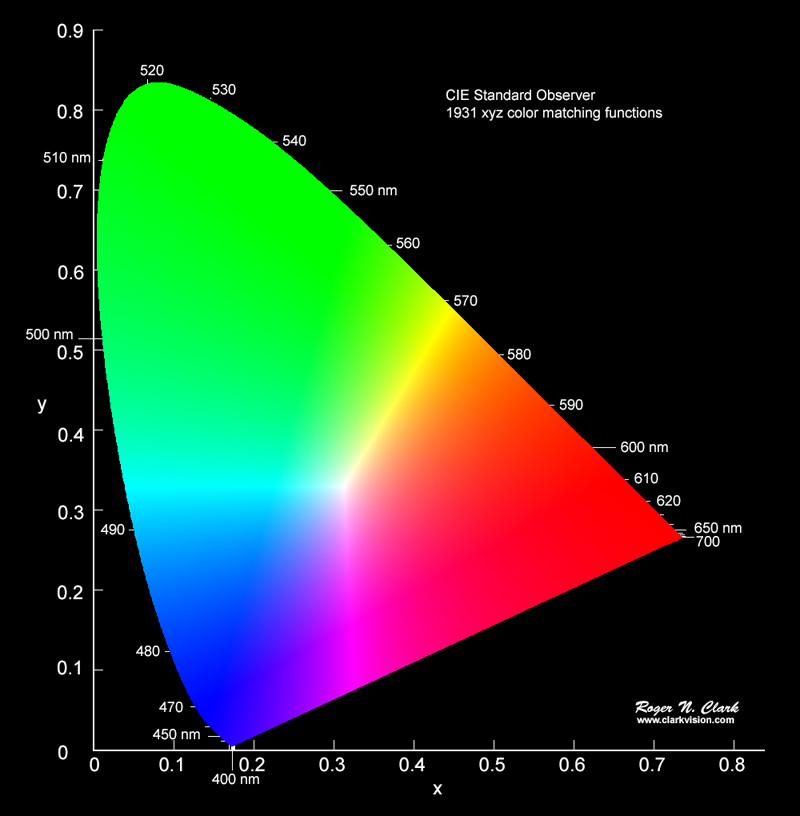
    CIE-1931 Chromaticity Diagram

    After a lot of research and a lot of measurement, scientists determined that this represents all possible colors a typical human can see. Just the hue – color – not the brightness.

    Very simply, a gamut is just a representation of what part of this spectrum a particular device can reproduce or capture.

    Show me

    The next figure shows the horseshoe with some regions overlayed on it.
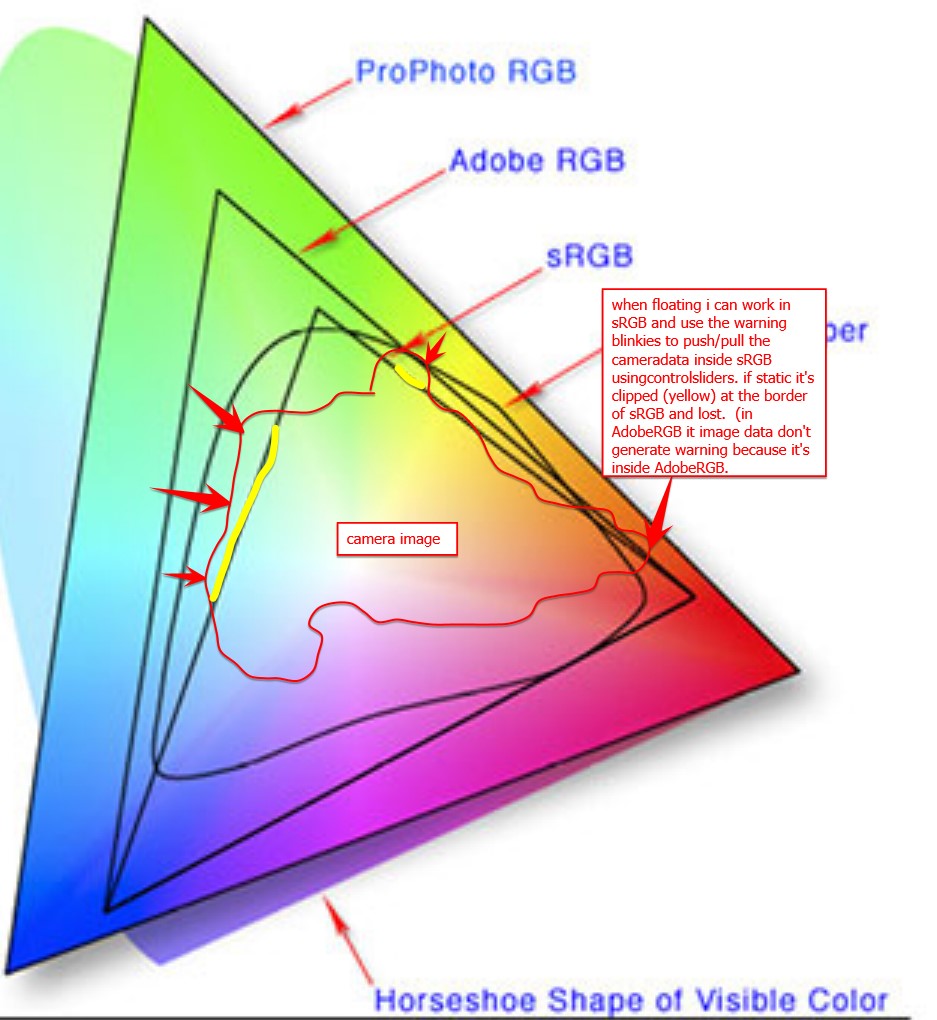
    Add ProPhoto colour space as a "working color space" - Which feature do you need? - DxO Forums

    There are 3 triangular regions labeled: sRGB, Adobe RGB, and ProPhoto RGB. They are called color spaces. The diagram is indicating all possible colors that each color space can represent. The smallest one, sRGB, is typical of a computer monitor. It is what will be used when you share a jpg image with someone. It is small but “safe”. We lose a lot of possible colors, but everyone sees roughly the same thing on all their monitors.

    Let’s jump to ProPhoto RGB. You can see that it covers the largest part of the horseshoe. In other words, ProPhoto RGB has the largest gamut. It is the best we have for representing image color and most professional photographers use this now. Unless they are doing weddings. That is a different world.

    They’re not ideal?

    Unfortunately, these color spaces are an ideal. The ProPhoto color space is a model for editing images. No actual devices or printers can give us the entire ProPhoto RBG gamut. Not even close. Most can barely do sRGB.

    Here is a diagram of the color space a Canon pro printer can do.
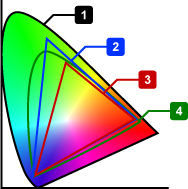
    The small horseshoe, labeled 4, is the printer gamut. It is larger then sRGB (3) and, overall, a lot like AdobeRGB (2). Smaller than ProPhoto RGB, which is not listed here.

    It looks pretty good, and in general it is. I use one of these printers. But look at what it does not do. Most greens and extremes of cyan and blue and purple and red and orange and yellow cannot be printed. Actually, almost no extremely saturated colors can be printed.

    And it is not just printers. Most monitors, even very good ones, are somewhere between sRGB and AdobeRGB spaces. This cannot really be considered a fault of the monitors or printers. The physics and engineering and cost considerations prohibit them from covering the full ideal range.

    Any of these colors that I use in an image, that can’t be created by the device I am using, are referred to as “out of gamut”. Outside of the color space the device can produce. This is what I have been running in to lately.

    What happens

    So what happens when I try to print an image with out of gamut colors? Well, it is not like it blows up or leaves a hole in the page instead of printing anything. Printers and monitors do the best they can. They “remap” the out of gamut colors to the closest they can do. As artists, we have some control over that process, as we will see in the next section.

    But the reality is that these out of gamut colors will lose detail, be washed out and without tonal contrast. When we get to looking at the print, we will say “yech, that is terrible”. Then we need to do something about it.

    What can we do about it

    There are things to do to mitigate the problem. Here is where we need to understand enough about the technology to know what to do.

    First, we have tools to help visualize the problem. Both Lightroom Classic and Photoshop have a Soft Proof view. It will simulate the actual output for a particular printer and paper. You can also view gamut clipping for the monitor. Yes, because of gamut problems you may not be seeing the image’s real color information on your monitor.

    Both Lightroom and Photoshop have versions of saturation adjustments and hue adjustment. These can help bring the out of control colors back into a printable or viewable range. With practice we can learn to tweak these settings to balance what is possible with what we want to see.

    But even if we give up and decide to print images with out of gamut colors, there are options. the print settings have a great feature called “rendering intent”. They are a way to give guidance to the print engine on how we want it to handle these wild colors. Several different rendering intents are available, but the 2 that are most commonly used are Relative and Perceptual.

    Rendering Intents

    I use Perceptual intent most often, at least in situations where the are significant out of gamut colors. Using the Perceptual directive signifies to the print driver that I am willing to give up complete tonal accuracy for a result that “looks right”. The driver is free to “squish” the color and tone range in proportional amounts to scale the whole image into a printable range. I don’t do product photography or portraits, so I am usually not fanatical about absolute accuracy. How they work this magic is usually kept as a trade secret. But secret or not, it often does a respectable job of producing a good output.

    The other common intent is Relative. This basically prints the data without modification, except that it clips out of gamut colors. That sounds severe, but the reality is that most natural scenes will not have any significant gamut problems, so no clipping will occur.

    This is a great intent for most types of scenes, because no tonal compression will take place.

    The answer

    The answer is “your mileage may vary”. Most images of landscapes and people will not have serious out of gamut problems. When you do, this information may help you get the results you want. When you have a problem, turn on the soft proofing and try the Relative and Perceptual rendering intents. Look at the screen to see if one is acceptable. If not, go back and play with saturation and colors .

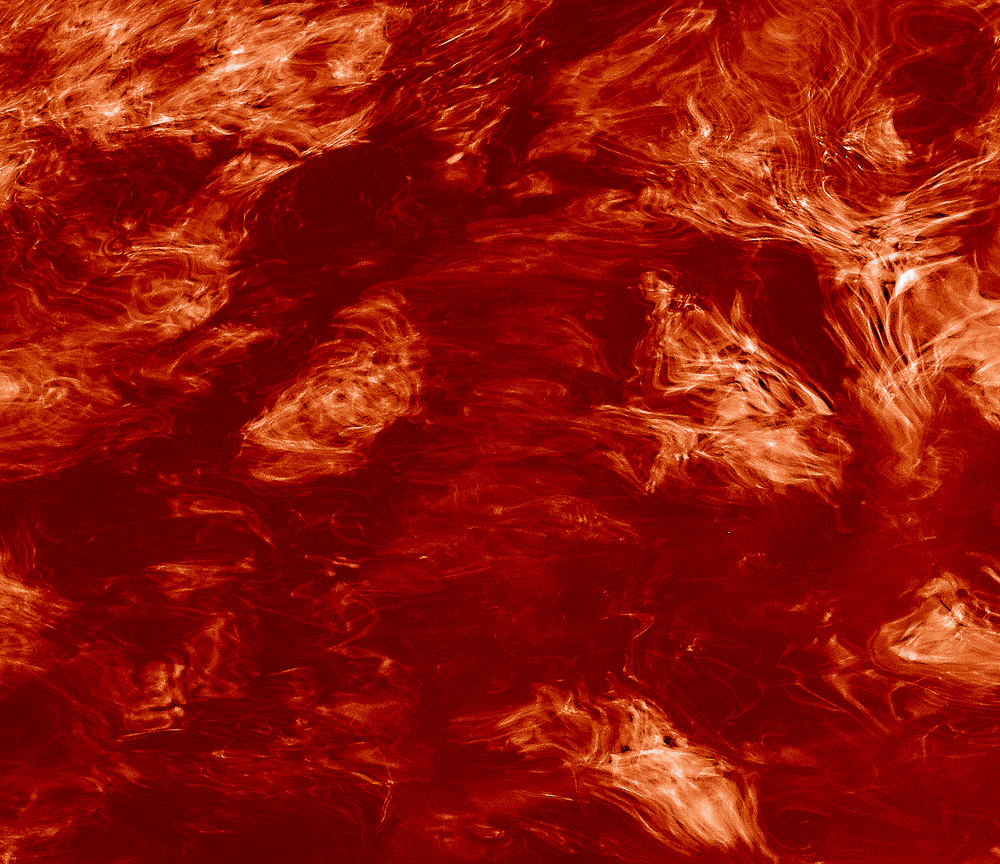
    Why do I have problems? Well, I’m weird. I have been gravitating to extremely vibrant, highly saturated images. I like the look I am trying to get, but it can be hard to get it onto a print. The image at the top of this article is a slice of an image I am working with now. It is seriously out of gamut. I need to work on it a lot more to be able to print it without loss of color detail. Ah, technical limitations.
  • Is Scaling Bad?

    Is Scaling Bad?

    I have written about image sharpness before, but I was challenged by a new viewpoint recently. An author I respect made an assertion that gave me pause. He was describing that when you enlarge film it is an optical scaling but digital enlarging requires modifying the information. Implying that modifying information was bad. So I was wondering, is digital scaling bad?

    Edges and detail

    Let me get two things out of the way. When we are discussing scaling we only mean upscaling, that is, enlarging an image. Shrinking or reducing an image size is not a problem for either film or digital.

    The other thing is that the problems from upscaling mostly are edges or fine detailed areas. An edge is a transition from light to dark or dark to light. The more resolution the medium has to keep the abruptness of the transition, the more it looks sharp to us. Areas with gradual tone transitions, like clouds, can be enlarged a lot with little degradation.

    Optical scaling

    As Mr. Freeman points out, enlarging prints from film relies on optical scaling. An enlarger (big camera, used backward) projects the negative on to print paper on a platen. Lenses and height extensions are used to enlarge the projected image to the desired size.

    This is the classic darkroom process that was used for well over 100 years. It still is used by some. It is well proven.

    But is is ideal? The optical zooming process enlarges everything. Edges become stretched and blurred, noise is magnified. It is a near exact magnified image of the original piece of film. Unless it is a contact print of an 8×10 inch or larger negative, it has lost resolution. Walk up close to it and it looks blurry and grainy.

    Digital scaling

    Digital scaling is generally a very different process. Scaling of digital images is usually an intelligent process that does not just multiply the size of everything. It is based on algorithms that look at the spatial frequency of the information – the amount of edges and detail – and scales to preserve that detail.

    For instance, one of the common tools for enlarging images is Photoshop. The Image Size dialog is where this is done. When resample is checked, there are 7 choices of scaling algorithms besides the default “Automatic”. I only use Automatic. From what i can figure out it analyzes the image and decides which of the scaling algorithms is optimal. It works very well.

    All of these operations modify the original pixels. That is common when working with digital images and it is desirable. As a matter of fact, it is one of the advantages of digital. A non-destructive workflow should be followed to allow re-editing later.

    Scaling is normally done as a last step before printing. The file is customized to the final image size, type of print surface, and printer and paper characteristics. So it is typical to do this on a copy of the edited original. In this way the original file is not modified for a particular print size choice.

    Sharpening

    In digital imaging, it is hard to talk about scaling without talking about sharpening. They go together. The original digital image you load into Lightroom (or whatever you use) looks pretty dull. All of the captured data is there, but it doesn’t look like what we remembered, or want. It is similar to the need for extensive darkroom work to print black & white negatives.

    One of the processes in digital photography in general, and after scaling in particular, is sharpening. There are different kinds and degrees of sharpening and several places in the workflow where it is usually applied. It is too complex a subject to talk about here.

    But sharpening deals mainly with the contrast around edges. An edge is a sharp increase in contrast. The algorithms increase the contrast where an edge is detected.

    This changes the pixels. It’s not like painting out somebody you don’t want in the frame, but it is a change.

    By the way, one of the standard sharpening techniques is called Unsharp Mask. It is mind-bending, because it is a way of sharpening an image by blurring it. Non-intuitive. But the point here is this is digital mimicry of a well known technique used by film printers. So the old film masters used the same type of processing tricks to achieve the results they wanted. They even spotted and retouched their negatives.

    Modifying pixels

    Let me briefly hit on what I think is the basic stumbling block at the bottom of this. Some people have it in their head that there is something wrong or non-artistic about modifying pixels. That is a straw man. It’s as silly as saying you’re not a good oil painter if you mix your colors, since they are no longer the pure colors that came out of the tubes. I have mentioned before that great prints of film images are often very different from the original frame. Does that make them less than genuine?

    Art is about achieving the result you want to present to your viewers. How you get there shouldn’t matter much, and any argument of “purity” is strictly a figment of the objector’s imagination.

    One of the great benefits of digital imaging is the incredible malleability of the digital data. It can be processed in ways the film masters could only dream of. We as artists need to use this capability to achieve our vision and bring our creativity to the end product.

    I am glad I live in an era of digital imaging. I freely modify pixels in any way that seems appropriate to me.

  • Frozen in Time

    Frozen in Time

    Many of us go around trying to freeze moments in time. For a lot it takes the form of happy, smiling images to post to social media to prove (to us?) what a great time we are having on vacation, graduation, the wedding, etc. Or we may freeze great landscapes or seascapes or sunsets so we can show their beauty.

    But what is your experience when you share these moments with other people? You pull them up on your phone to show your buddy. Flip, view a few seconds, flip, flip (faster now), flip…. People only look at images on screen for a couple of seconds.

    As someone who shoots thousands of images and makes prints I can say from experience that an image is not really complete and meaningful until a great print is made.

    Digital images are impermanent

    Digital images are impermanent in several ways. They are just bits on your hard disk or in the “cloud”. Unlike in the days when we had albums or even shoe boxes of prints, our pictures now can disappear in an instant. Hard disks fail. I know very well. I have thrown away dozens of them.

    My main storage devices now are all RAID drives. This means they have multiple drives in each and the information is partitioned so that if one drive fails, everything can continue with no data loss. But that is just mitigating the problem.

    Technologies change and become obsolete. How many of you have some pictures on a floppy disk or CD or some other media that you can’t read anymore? It happens. Fairly frequently.

    And your cloud provider can go away or stop serving you if you don’t pay. Or if you don’t keep up with the never ending system updates for your computer and they stop supporting your version.

    Another problem with digital images is that most people do not have a good cataloging system for them. Are your images stored in chronological order in Apple Photos? How do you locate that great photo of Grandma you took once? Do you even remember the year? It sounds harsh, but if you can’t find it, you basically don’t have it.

    Digital images are fluid

    Another property of digital images is that they are fluid. That is, they can be changed at any time. That can be useful sometimes. Break up with that loser? Edit him out.

    On a more serious note, it also means that the look of the image can be changed at a whim, depending on your mood or your developing Photoshop skills. Your digital image will be content to exist on your disk in an easily editable state. By its nature, it is perpetually a work in progress. It does not require you to ask or answer hard questions. It is not forcing you to confront your feelings or interpretation. But a print commits the image to a hard media.

    When you make a print, you are compelled to think it through in more depth. You are not going to take the time and effort and expense of printing unless you know how you view the image. You work on it more that if you are going to put together a slide show. It has more permanence and It represents our convictions about the image at a point in time. This forces us to think about it more.

    When the ink is laid down you have created a piece of art, not just some bits. It means something different to you and your viewers.

    A good print is compelling

    Have you been in front of a well crafted original print by Ansel Adams or Dorothea Lange or John Paul Caponigro or any great photographer you like? It has depth and significance that is impossible to create on a screen. We assume from our experience that images on screen are fleeting. But these great prints are different.

    People look at images on a screen for a few seconds. They study great prints for minutes. The print can grab you; stop you in your tracks; confront you with something you can’t ignore. It is a piece of art, not just flickering bits. It is real.

    Prints are the gold standard

    I talked before about how transient bits can be and how devices fail and technologies go obsolete. Good prints, though, have substance. They are physical. They are a real object with weight and texture and size. A well done print can last 100-200 years without degrading. It is something that can stand the test of time.

    Ansel Adams stopped printing over 40 years ago, but one of his prints is as impressive today as it was then. And it will probably be as impressive 100 years from now.

    A print is a frozen idea

    As I mentioned, you are not compelled to “finish” your digital images. It is far easier to shoot than to finish them. You can leave them sitting there on your computer with only a fuzzy notion of how we really feel about them.

    When you commit to creating a print it forces you to confront your feelings or interpretation. You go through some serious self-examination. Once the ink is on the paper it is not going to change. It represents our idea about the image at a point in time. We have to go through the work to decide how we really feel about the image in order to print it. And we spend a lot more time bringing it to a high level of perfection.

    This is a good thing. We are creating a real, permanent object. It represents us. We feel pressure to make it our art. It is our expression for the world to see. We are creating something that will probably outlive us. We want our viewers to see what we saw and feel what we felt.

    It is quite possible to return to an image years later and make a new print that is very different. That is quite common and healthy. It means we have grown and developed new viewpoints. If we rework the image and create a new print, it is a new work of art. It could hang proudly beside the original as portraits of the artist at 2 different points in his life.

    It is the only physical result of photography

    When I press the shutter of my digital camera, not much really happens. Some photons are exposed to the sensor and some electrical change is read and converted to bits and transferred to the memory card.

    Even when I import the digital files into my computer, they are still just bits – minute, almost unmeasurable units of electrical or magnetic energy. I can hit the Delete key and they are gone without a trace. My main photo disk has over 6 TBytes of data on it (6,000,000,000,000 chunks of 8 bits). But it does not weigh a gram more than it did empty.

    I can argue that I have not actually made anything of value until I make a print. The print is something real. It is physical. People can see it and feel it and look at it as art or garbage. But regardless of how they feel about it, they can’t see or feel anything until it is a print. The print can be framed and hung on the wall and passed down to generations or sold. The bits cannot.

    It completes the cycle

    And printing is good for you as an artist. It completes the process. It brings art to life. You have to work at it, wrestle with it, make mistakes and do it over. You have to make hard decisions that shape the final result. The print is a commitment of your vision, frozen in time.

    And when you get done, you may be disappointed. You envisioned more. You hoped, when it was just bits, that it would be more. The reality of the print can be cruel. You have to reexamine everything from your conceptual idea to your technique. It is what it is. Learn from it. We want people to see and feel what compelled us to take the picture. Sometimes it works. Sometimes it doesn’t.

    But you won’t know what it really is until you have made the best possible print. That is your art. If you revisit the image later you may see it differently and print a different interpretation. Printing is a key expression of our art.

    I reference Ansel Adams a lot in this article. In closing, he famously said:’

    The negative is comparable to the composer’s score and the print to its performance. Each performance differs in subtle ways.”